Dask usage
The package daskslurm may be found in the GitLab project DaskSlurm (authentication to GitLab is necessary to access the project page). It enables a CC-IN2P3 Jupyter Notebook Platform user to run one or more tasks on the CC-IN2P3 computing platform.
Important
While it opens a connection to the computing servers, Dask IS NOT an alternative tool to submit jobs on the computing platform. Please refer to the dedicated section if this is your objective.
The computing ressource used by Dask tasks will be deducted from the annual computing group allocated HTC ressource.
Please find here a collection of examples specific to this use

Installation
The daskslurm package is already installed into the 2 provided scientific default kernels. However, if you are using a custom kernel, you will need to install it yourself.
Attention
The daskslurm package requires a minimum of Python version 3.11. Please adapt your virtual environment accordingly.
To install the daskslurm package:
% export daskslurm_package_registry="https://__token__:gldt-Jziuo-bHMVzJcrPV-8Wz@gitlab.in2p3.fr/api/v4/projects/36268/packages/pypi/simple"
% python -m pip  install  --extra-index-url  "${daskslurm_package_registry}"  daskslurm=='0.1.3'
Note
Please refer to the GitLab project DaskSlurm to check available version, and to select the latest.
Features
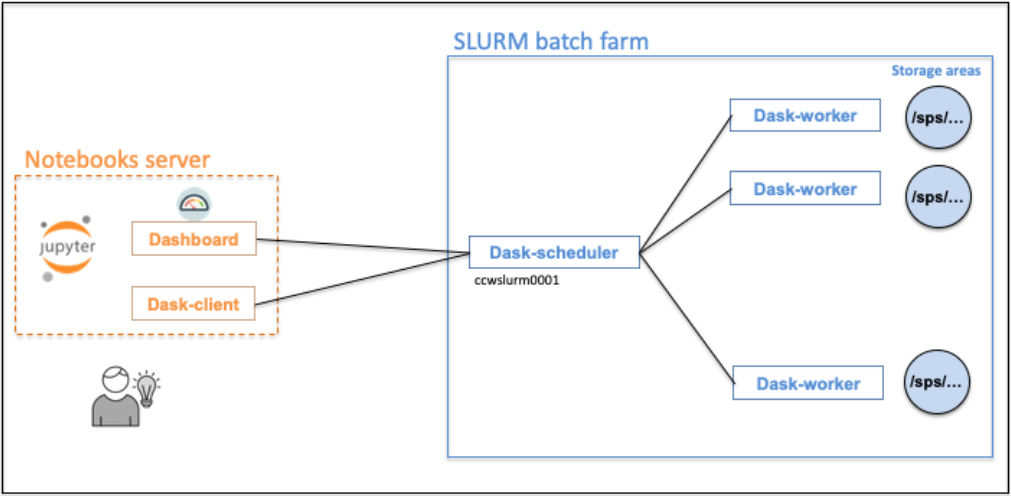
The dask-workers will be running on our computing platform. The dask-client, running in your notebooks server, will be connected to the dask-scheduler.
Attention
HPC jobs will not be allowed through the Dask functionality.
Getting a dask-client
To get a dask-client, you will have to wait for the dask-worker jobs being in RUNNING status.
import daskslurm
from daskslurm.cluster import DaskSlurmCluster
my_daskslurm_cluster = DaskSlurmCluster()
Cancelling computing tasks
Computing tasks are automatically cancelled when stopping the notebooks server, by selecting File > Log Out.
Nevertheless it’s possible to cancel tasks from your Jupyter notebook via the close() method.
my_daskslurm_cluster = DaskSlurmCluster()
...
my_daskslurm_cluster.close()
Default parameters (which can be updated) for the compute tasks
dask_worker_jobsdefault is:1job, max value:3000;
dask_worker_memorydefault is:3G, max value:32G;
dask_worker_coresdefault is:1core, max value:32;
dask_worker_timedefault is:02:00:00(2 hours), max value:48:00:00(2 days);See the constructor docstring
DaskSlurmCluster(...)for the complete list of parameters.
Logging messages
The jobs STDOUT and STDERR are written in the log/ directory of the current working area. There is one file per job. Since logging is useful to help debugging, a ready-to-use logger is available via the get_logger() method.
# get_logger available as function
from daskslurm.cluster import get_logger
my_logger = get_logger()
my_logger.info("Processing data files ...")
When used in Python code part processed on dask-workers, the messages will be sent to the job stdout files.
scale() method
The scale() method allow to increase, or decrease the number of dask-workers without having to recreate a DaskSlurmCluster.
my_daskslurm_cluster = DaskSlurmCluster()
# Scale to 10 dask-worker job(s)
my_daskslurm_cluster.scale(jobs=10)
Limitations
Maximum number of dask-worker jobs
This number is principally related to the number of available slots in the computing platform. This depends on several factors like the group resources allocation, the number of simultaneous users, the current global load of the computing platform, …
Internal tests were carried out with 2500 jobs (= 2500 dask-workers) for a single user.